
Identificación de objetos por CSS Selector
Esta página no está en español en la antigua dokuwiki, preguntar a Ana, ¿si la hemos quitado por algún motivo? o no está por otro.
Como se dijo en Identificación de Objetos, CSS Selector es una forma simple y fácil de identificar objetos en HTML (identificando uno o muchos elementos) y muy útil.
Cuando se selecciona un objeto, en las pruebas, es necesario ser específico, y para ello, el uso de CSS tiende a conducir a selectores como span[name='coches'] en lugar de la forma XPath
bodydiv/spn/span/table/tr/tr/tr/td/td/td/td/span[@name='cars'].
CSS Selector se basa en definir el tipo de elemento añadido a la definición de uno o varios atributos. También es posible definir sólo el tipo de elemento (esto tiende a ser inexacto) o sólo los atributos (uno o más). Al final de la página, algunos ejemplos muestran la forma de hacerlo.
Formula:
TheLa formulationformulación ofde a CSS Selector canpuede bedefinirse definedde bydos two formulas:maneras:
-
element[attribute(*|^|$|~)='value']
-
element(sym)'value'
TheLa parte del elementelemento portionserá willqué betipo whatde elementelemento kindnecesita needsser toseleccionado. beLa selected.parte Thedel attributeatributo portionserá willel beatributo whatque attributeel theusuario userestá isseleccionando. selectingLa on.parte The ((*|^|$|~) portiones isun anoperador optionalde comparisoncomparación operatoropcional dependingdependiendo onde whatlo isque neededse necesite (ForPor example:ejemplo: EqualsIgual a ( = ); StartsEmpieza withpor ( ^= ); EndsTermina withpor ( $= ); ContainsContiene ( *= ); ContainsContiene inen auna listlista ( ~= )). ((sym)sym) representsrepresenta theel shortcutacceso createddirecto forcreado thepara twolos mostdos usedatributos attributesmás utilizados (ID andy class)clase).
InEn casecaso thede userque wantsel tousuario specifydesee moreespecificar thanmás onede attributeun toatributo recognizepara thereconocer element,el thiselemento, isesto alsotambién possiblees byposible concatenatingconcatenando moremás thande oneuna specification,especificación, oneuna rightjusto afterdespués thede other.la Usingotra. thisDe way,esta weforma, lookbuscamos forel theelemento elementque that complies withcumpla BOTHambas conditions,condiciones, ascomo inen thela sentencesentencia elementtype[attribute1(atributo1(*|^|$|~)='value1'valor1'][attribute2(atributo2(*|^|$|~)='value2'valor2']. El elemento tiene que ser un elemento "elementtype", con el "valor1" en el "atributo1" y el "valor2" en el "atributo2".
También sería theposible elementutilizar has to be an “elementtype” element, with the “value1” in “attribute1” and the “value2” in the “attribute2”. It would be also possible to use theel selector [attribute(*|^|$|~)='value'] butpero thisde wayesta willforma make theel selector tose runejecutaría oversobre alltodos thelos elements,elementos, andy notno onlysólo oversobre thelos onesque thatcoinciden matchcon theel typetipo ofde elementelemento thatque webuscamos, arepor lookinglo for,que thuses ismuy higlyrecomendable recommendableutilizar toel usetipo thede elementelemento typepara foragilizar speedingel up the process.proceso.
ForPara somealgunos ofde thelos mostatributos usedmás attributes,utilizados, therehay arealgunos someatajos shortcutsque thatse canpueden beutilizar usedpara tofacilitar easeel thetrabajo testerdel job.probador Theyo worktester. asFuncionan thecomo followinngla sentencesiguiente sentencia element(sym)'value' wheredonde thela parte element portionrepresenta representsel thetipo kindde ofelemento theseleccionado element selected andy (sym) ises theel symbolsímbolo needednecesario. (seeLos explanationsímbolos below).son The symbols are # forpara thelos IDsID (element#idvalue oro #idvalue) andy . forpara thelas classesclases (element.classvalue oro .classvalue).
El canusuario alsotambién joinpuede thisunir twoestas ways,dos forformas, creatingpara acrear sentenceuna sentencia similar toa element(sym)'value'[attribute='value'].
ThereTambién isexiste alsola posibilidad de anidar los elementos (es decir, hacer referencia a possibilityun toelemento nesten thefunción elementsdel (itelemento means, to refer to an element depending on the parent element)padre). ItSe ishace donecon withel thesímbolo symbol> >como asen inla the sentencesentencia parentelement[attribute=attrvalue]>element[attribute=attrvalue] oro anycualquiera ofde thelas otherotras possibilitiesposibilidades saiddichas beforeantes instead.en su lugar.
Examples:Ejemplos:
TheLas imagesimágenes belowsiguientes show,muestran, forpor instance,ejemplo, somealgunas differentformas waysdiferentes tode identifyidentificar anun object:objeto:
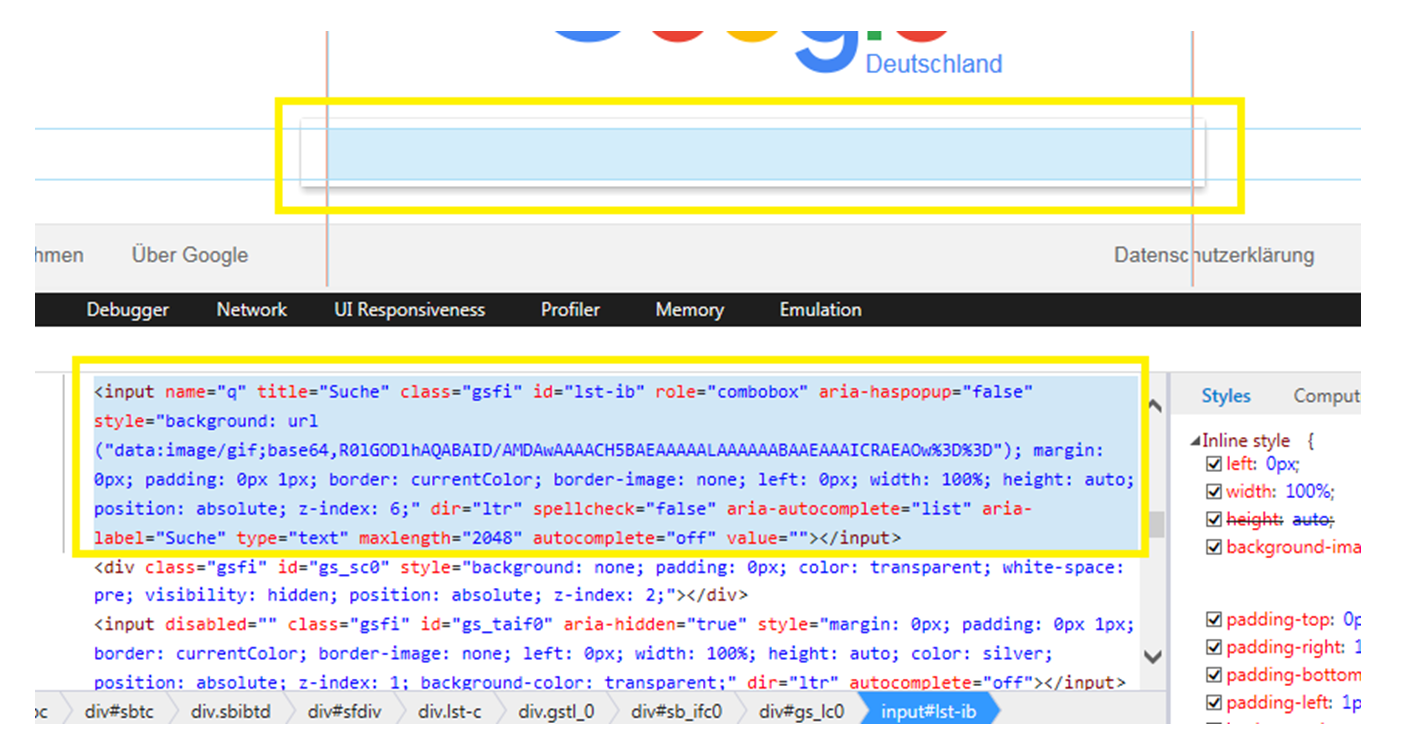
In this specific case, there is an ID. It is usually the easiest way to ensure an unique identification, so any of the following are supposed to find the element without problems:
-
input#lst-ib
-
#lst-ib
-
input[id='lst-ib']
-
[id='lst-ib']
-
input[id$='-ib']
-
input#lst-ib[role='combobox']
-
#lst-ib[maxlength='2048']
-
input[id='lst-ib'][style*='image/gif;base64']
The last three are, in this case, unnecessary, due to there are no more elements with the “lst-ib” ID. Even so, it is possible to add as much info as needed to the sentence.
In case the object had no ID determined, it would be possible to concatenate as many attributes as we think are enough for identifying only the desired object:
-
input[title='Suche'][aria-label=“suche”][name='q']
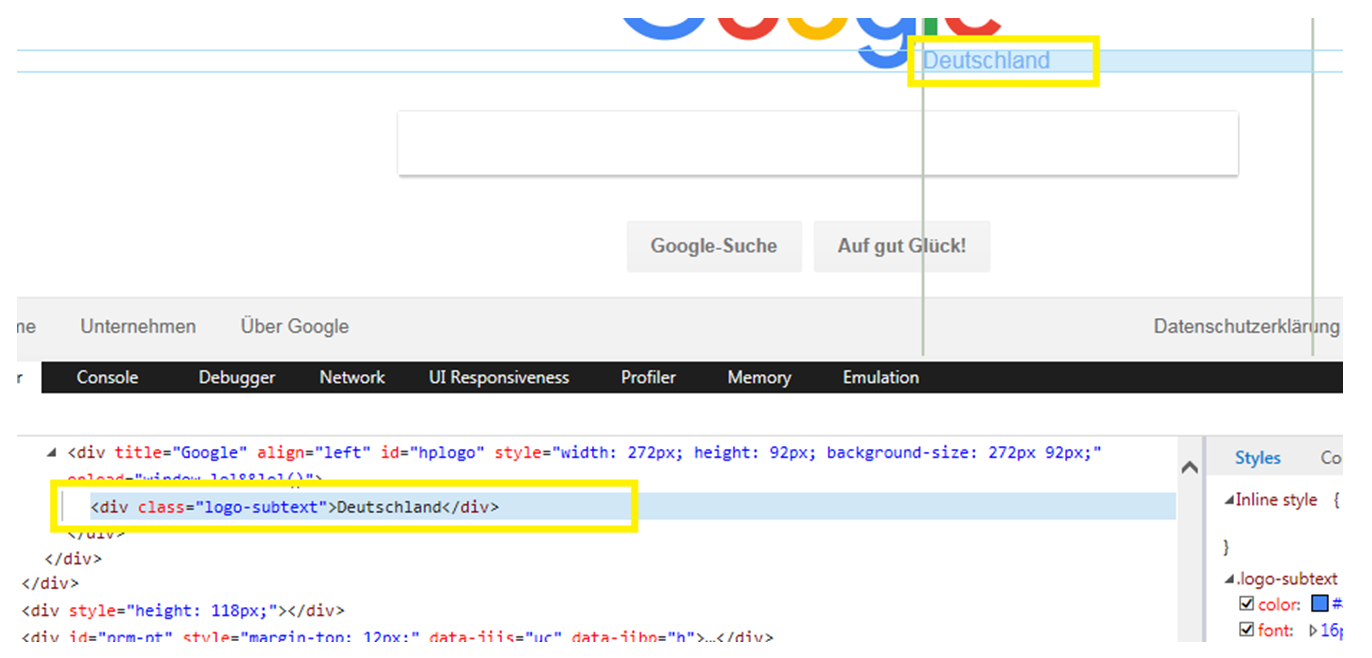
As a second example, in the image at the right side, there is another screenshot where can find no ID attribute for the <div> “Deutschland”. This is an element that has a class “logo-subtext”. The user can face two scenarios (this class represents univocally the element or not). Regarding the first scenario, some possibilities would be:
-
div.logo-subtext
-
.logo-subtext
-
div[class='logo-subtext']
-
[class='logo-subtext']
If the case is not as said before, we can join more than one attribute or condition, in order to make the identification possible. Since this element has no more attributes, the user can get advantage of the nest functionality of CSS Selector:
-
#hplogo>div
-
#hplogo>div.logo-subtext
-
[id='hplogo']>div
-
div[title='Google']>div[class=logo-subtext]
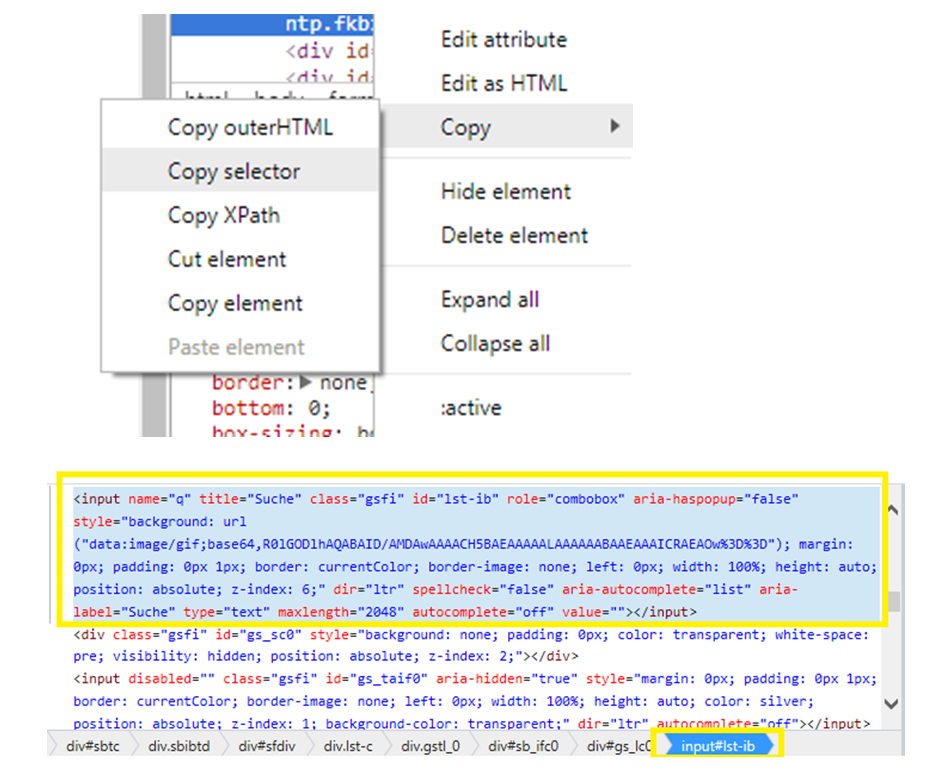
As is seen in the first image, there is a possibility to get directly a CSS Selector by choosing the element and seeing (not possible to copy) the code in the very right bottom of the image. If using Google Chrome, it also possible to click with the right button in the element needed and click on “Copy selector”.
Para más información sobre el selector CSS pulsamos aquí.